
VAT on the fiscal receipt - the 18%, 8% and 0% rates and the letters A, C, D, E
How VAT appears on a fiscal receipt in Kosovo, what the letters next to the amounts mean, how VAT is calculated from a VAT-inclusive price and how it flows into the VAT return.
Updated · 3 min read

In short: In Kosovo, goods are sold at 18% VAT (the standard rate), 8% (the reduced rate), 0%, or are exempt from VAT. On the fiscal receipt every item carries a letter: E for 18%, D for 8%, C for 0% and A for exempt items. At the bottom of the receipt you’ll find the VAT for each rate and the total excluding VAT. ProBooks calculates all of this automatically and carries it through to the VAT return.
Rates and letters
| Letter | Rate | Typical examples |
|---|---|---|
| E | 18% | Drinks, sweets, detergents, most goods |
| D | 8% | Some basic foods, such as milk and eggs |
| C | 0% | Zero-rated supplies |
| A | Exempt | Items exempt from VAT |
The correct rate for each item is set by law and by your accountant’s decision; ProBooks simply applies whatever you set on the item.
What it looks like on the receipt
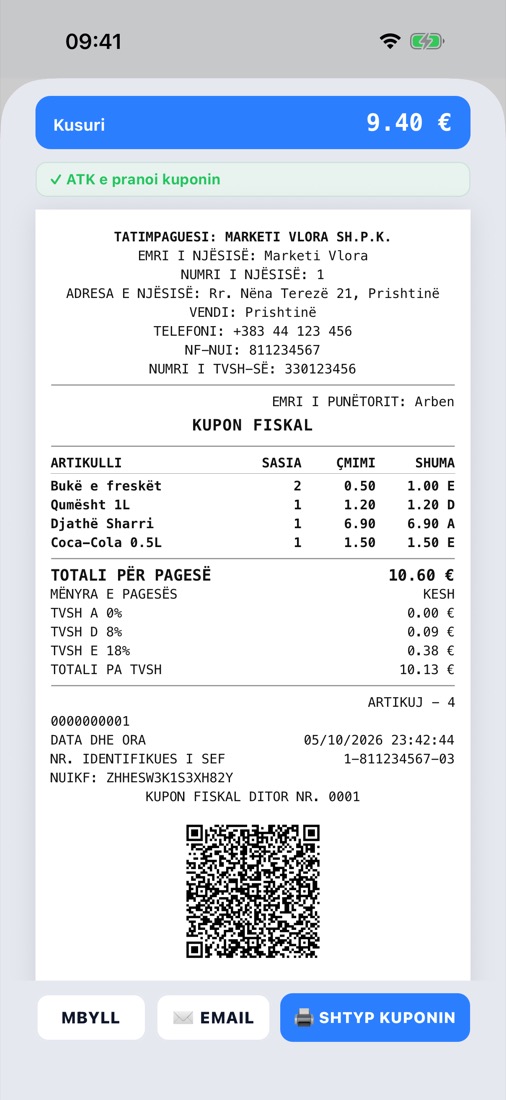
The letter after the amount shows the rate; below are the VAT for each rate and the total excluding VAT.
On the receipt above:
- 1.00 E means the bread carries 18% VAT;
- 1.20 D - the milk at 8%;
- 6.90 A - the cheese, exempt from VAT.
Below the total, the receipt lists TVSH A 0%, TVSH D 8%, TVSH E 18% (VAT by rate) and TOTALI PA TVSH (Total excluding VAT).
How VAT is calculated from a VAT-inclusive price
Till prices are usually VAT-inclusive. The VAT contained in the price is calculated like this:
VAT = Price incl. VAT × rate ÷ (100 + rate)
Example: Coca-Cola at €1.50 with 18% → 1.50 × 18 ÷ 118 = €0.23 VAT, and €1.27 excluding VAT.
ProBooks does this for every line, totals it per rate and rounds according to the receipt rules: up to 4 decimal places for unit prices and 2 for totals.
VAT-registered or not
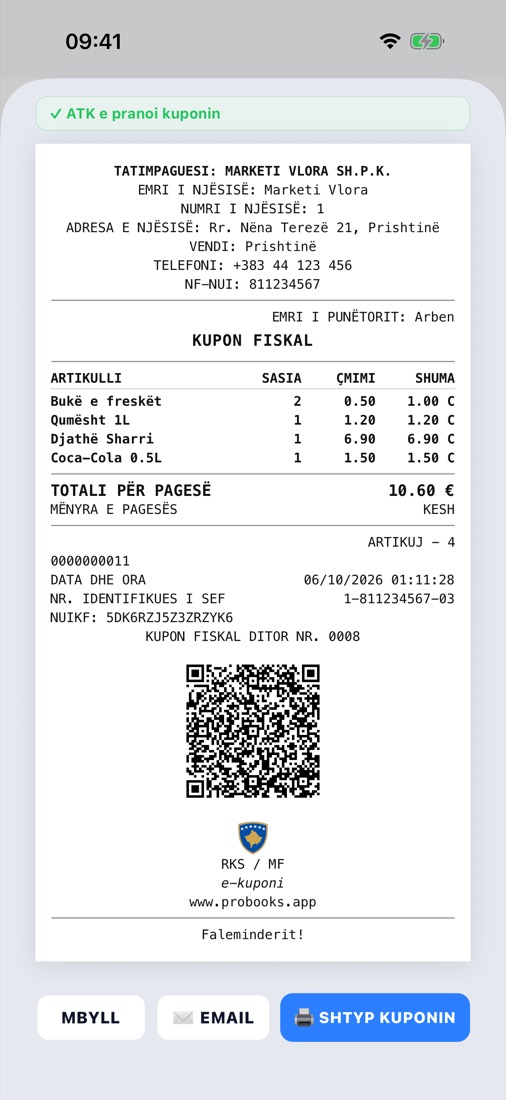
A business that is not registered for VAT issues receipts without the VAT breakdown.
If your business is not registered for VAT, the receipt is printed without the VAT sections. ProBooks knows your status from the company details and adjusts the receipt automatically. When you become VAT-registered, update the company status - new receipts will include VAT.
From the receipt to the VAT return
- Every receipt is posted to the sales ledger with the taxable amount and VAT per rate.
- Purchases (including those scanned with AI) go to the purchase ledger.
- At month end, the VAT return is filled in from the ledgers; ProBooks also carries forward any VAT credit from the previous month.
- With Mbyll TVSH-në e muajit (Close the month’s VAT) you lock the period so it can’t change after filing.
Common mistakes
- Wrong rate on an item. Check the rates when you import your catalogue - one mistake repeats on every receipt.
- VAT-exclusive prices on the till. Enter the final price for the customer on the till; ProBooks extracts the VAT itself.
- Exempt items marked as 0%. A and C are not the same thing - ask your accountant.
Frequently asked questions
Can the same item have different rates? Not at the same time; the rate is a property of the item. If the law changes, update the rate and new receipts will use the new one.
Does VAT appear on a return receipt? Yes, as a negative amount, and it is deducted from the month’s VAT.
Who fills in the VAT return? ProBooks prepares it from the ledgers; your accountant reviews and files it. Ask us how accounting firms with many clients handle this.