In short: A fiscal till in Kosovo no longer has to be a device. Under Administrative Instruction (MFPT) no. 01/2026 the fiscal receipt can be issued by a program certified by ATK, the Electronic Fiscal Software (SEF). ProBooks is a SEF certified by ATK on 13 October 2026 (no. 964020394056) for iPhone, Android, iPad, Mac and Windows: the receipt is signed on the device, gets its QR code and is sent to ATK; without internet it is stored and sent automatically when the connection returns. The first till costs €100 a year, each additional till €50, and you can try it free for 15 days.
The fiscal till today: fiscal device or software?
Until 2026 “fiscal till” meant a device with fiscal memory (PEF), bought from a licensed dealer and maintained by a technician. Instruction 01/2026 adds the second route: certified software (SEF) that runs on the devices you already own.
| Fiscal device (PEF) | Electronic fiscal software (SEF) | |
|---|---|---|
| What you buy | Dedicated hardware for every till | A software licence; use your phone, tablet or computer |
| The receipt | From the device’s fiscal memory | Digitally signed, with a QR code |
| Sending to ATK | Depends on the device | In real time; offline it is stored and sent later |
| Changes (items, prices, VAT) | Often via a technician | Yourself, in the software |
| Link to the books | Usually by hand | The sale posts itself to the accounts |
| Who allows it | ATK, through licensed dealers | ATK, the public registry of certified SEF |
If you already have a fiscal device, you can keep using it or move to a SEF voluntarily whenever you want; the mandatory move for these businesses is set by the Minister of Finance by decision. If you are opening a new business and have no device, you are not obliged to buy one: install and use a SEF (article 50; the instruction gave 60 days from its entry into force for this). The full explanation is in the guide to fiscalization with SEF and on the Electronic Fiscal Software (SEF) page.
Which fiscal till for which business
| Business | The till we recommend | Why |
|---|---|---|
| Café, restaurant, bar | SEF Mobile on a phone or tablet | The waiter issues the receipt at the table; split payments; drinks stock |
| Supermarket, minimarket | MiniPOS on Windows | Barcode scanner, thermal printer, fast queues, several tills |
| Clothing or electronics shop | MiniPOS or SEF Mobile on an iPad | Refunds linked to the receipt; several branches |
| Salon, barber, tradesperson | SEF Mobile on a phone | A few receipts a day; everyone with their own PIN |
| Wholesale, field sales | SEF Mobile on a phone + ProBooks web | The agent fiscalizes at the customer, even offline |
| Service office | SEF Mobile on a Mac or phone + invoicing | Receipts for individuals, invoices for businesses |
Every till connects to the same company in ProBooks web: items, prices and operators are set once and apply everywhere.
What every fiscal till must do under ATK rules
Whichever software you choose, ask for these, because ATK requires them:
- A receipt for every sale to the final consumer, whether paid in cash, by card or by transfer.
- The receipt elements: the business name and NUI, the unit, the items with their VAT rate, the total, the payment method, the operator’s name, the receipt number, the NUIKF and the verification QR code.
- Work without internet: the receipt is signed on the device and sent automatically when the connection returns.
- Cancellations and refunds only through a new receipt linked to the original; a receipt is never deleted.
- A digital certificate for every till and a fiscalization number from ATK’s system.
ProBooks meets all of them: see the receipt elements, working offline and refunds and cancellations with real screenshots.
What the fiscal till costs
| ProBooks | |
|---|---|
| First till (receipts only) | €100 a year |
| Each additional till | €50 a year |
| With invoicing and full accounting | from €150 a year, by type of business |
| Hardware | The phone, tablet or computer you have |
| Printer | An ordinary thermal printer with USB, Bluetooth or network (not a «fiscal printer») |
| Updates | Included, no technician |
| Trial | 15 days free, no card |
Work out the exact price for your number of tills on the pricing page.
How to start with the fiscal till: 4 steps
- Unique Fiscalization Code. In ATK’s EDI system, under Fiskalizimi → Kërkesë për Fiskalizim, apply for the code (a service opened on 9 July 2026). It is a prerequisite for every SEF.
- ProBooks account. Open your company (15 days free), add the items with their VAT rates and the operators with PINs.
- The till. Download SEF Mobile from the App Store or Google Play, or MiniPOS for Windows, and connect the till to the company.
- The first receipt. Make a test sale: the receipt gets its QR code and the status “accepted by ATK”. From then on every sale reduces stock and posts to the books.
What it looks like in ProBooks
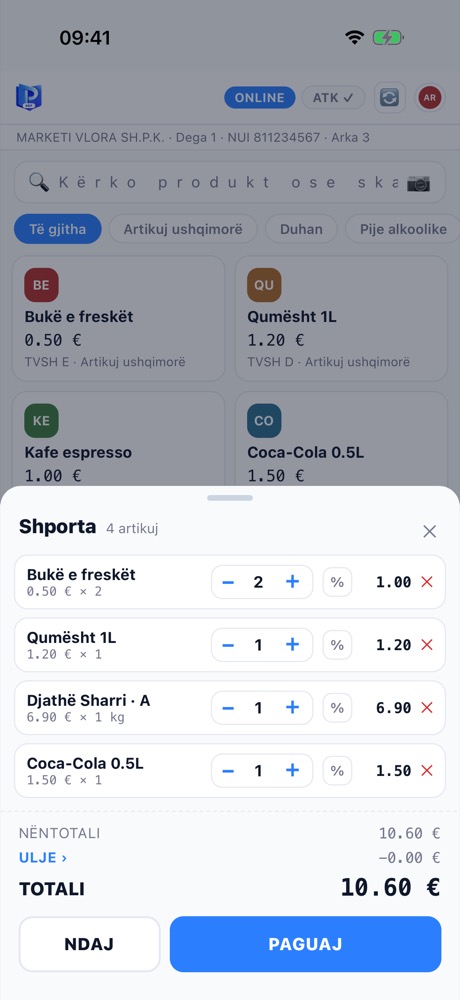
The basket: items, discount and total - the cashier taps and closes the sale.
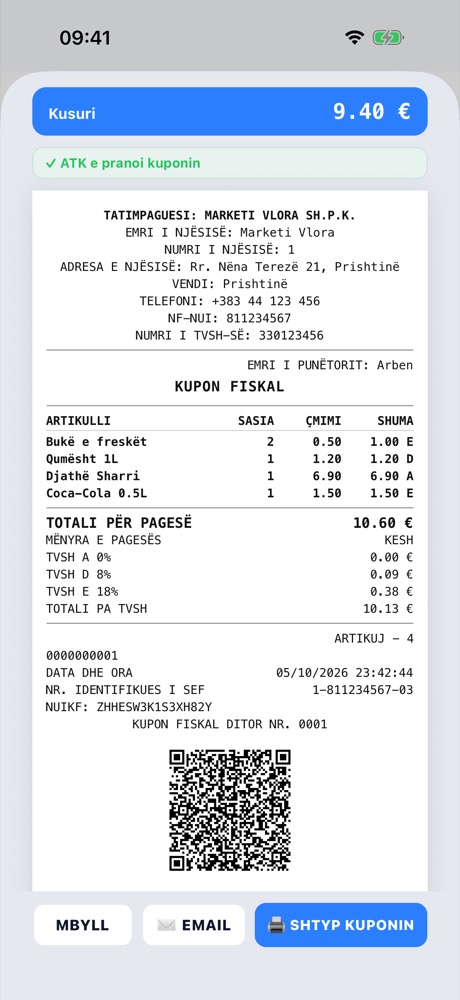
The receipt with its QR code and the acceptance status from ATK.
ProBooks is fiscalization and accounting software for businesses in Kosovo: till, invoicing, stock, VAT and the books in one system, in Albanian, English and Serbian.
Frequently asked questions
Do I have to buy a fiscal device if I open a new business? No. Under article 50 of Instruction 01/2026, obligated taxpayers without a fiscal device are not required to buy a PEF: they install and use a certified SEF (the instruction gave 60 days from its entry into force for this).
Can I use my phone as a fiscal till? Yes, if the software is certified by ATK for Android or iOS. ProBooks SEF Mobile is certified for both, as well as for iPad, Mac and Windows (MiniPOS).
Does the fiscal till work without internet? Yes. The receipt is signed on the device, gets its QR code and is stored; when the connection returns, the receipts are sent to ATK automatically. Sales are never blocked.
How much does the ProBooks fiscal till cost? €100 a year for the first till (receipts only) and €50 a year for each additional till. Packages with invoicing and accounting start at €150 a year.
Do I need a printer? For cash sales the receipt is printed on paper (article 39); an ordinary thermal printer with USB, Bluetooth or network connection is enough, not a «fiscal printer». For non-cash payments and online sales the receipt can be sent to the buyer electronically, with their consent.
How do I verify that ProBooks is certified by ATK? In ATK’s public registry (apps.atk-ks.org/sefaplikimi/PublicSEF), entry “Probooks”: no. 964020394056, certified on 13.10.2026 for Windows, macOS, Android and iOS.
Sources
- Public registry of certified SEF - ATK, checked on 16.10.2026
- Administrative Instruction (MFPT) no. 01/2026 on the use of electronic fiscal devices, fiscal systems and electronic fiscal software, 27.04.2026
- ATK notice on the “Request for Fiscalization” service in EDI, 09.07.2026
This text is informative; for your own case consult ATK or your accountant.