
Fiscal till without internet - how SEF works offline and the 48-hour window
What happens to receipts when the internet goes down, why sales should never stop, how the ATK 48-hour window works and how owners can see pending receipts.
Updated · 4 min read

In short: When the internet goes down, ProBooks SEF keeps selling as normal. Every receipt is signed on the device, gets its QR code and is stored in a way that cannot be altered. The till shows how many receipts are pending and how much time is left in the legal 48-hour window. As soon as the connection returns, the receipts are sent to the tax authority (ATK) automatically, oldest first.
Why “sales never stop” is the first rule
Picture a Saturday at the supermarket: the queue reaches the door, and the internet drops. If the till locks up, you either lose the sales or sell without a receipt - and both are a problem. That’s why ProBooks SEF is built on one simple principle: sales are never blocked, neither offline nor with a wrong clock. Banners only warn; the cashier makes the call.
What the cashier sees when the internet drops
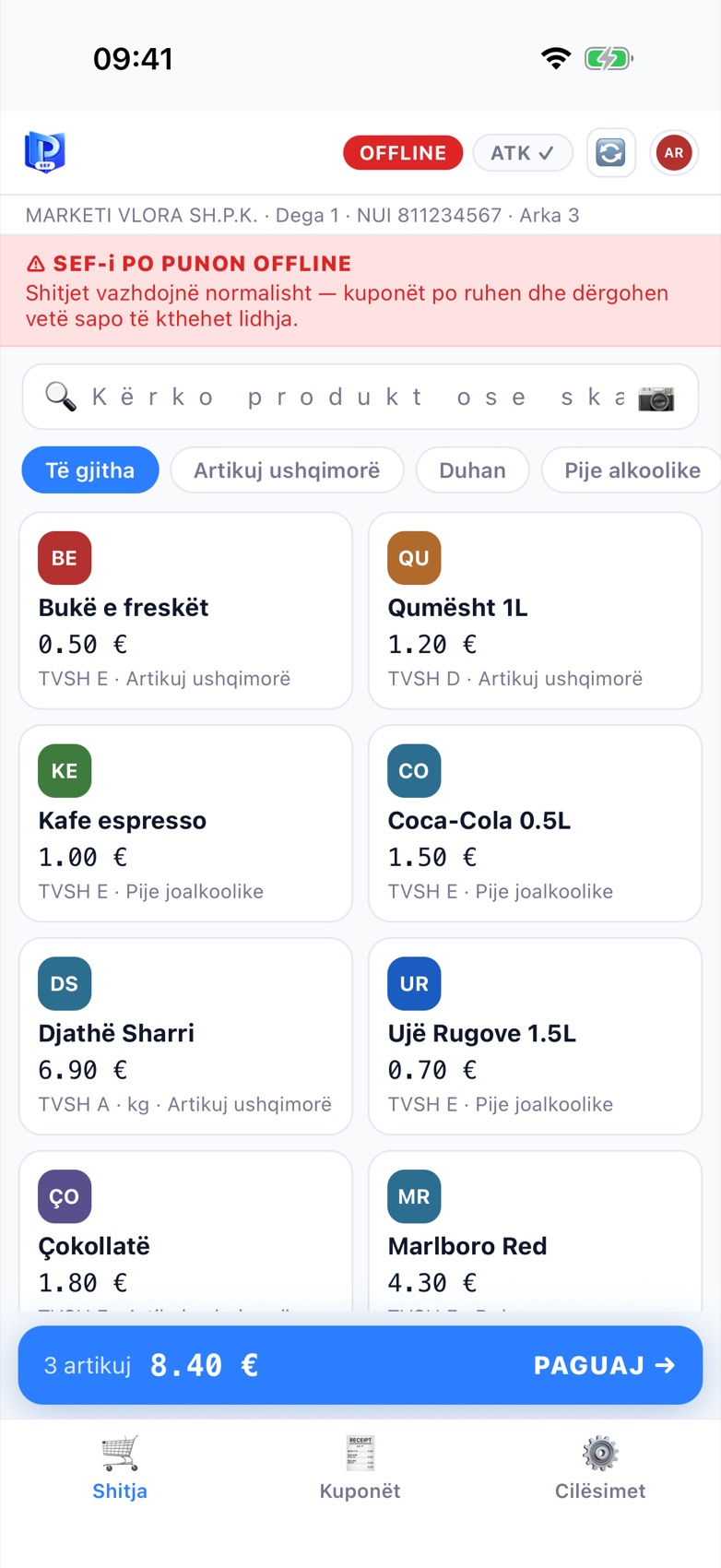
The red banner at the top of the sales screen.
- The ONLINE pill at the top turns into a red OFFLINE.
- Below it, the banner ⚠ SEF-i PO PUNON OFFLINE (SEF is working offline) appears with an explanation: sales continue as normal, receipts are stored and sent automatically once the connection returns.
- A small chip shows how many receipts are pending and how many hours are left in the 48-hour window.
- The ATK pill shows the number of pending receipts, e.g. ATK 3 ⏳.
The cashier doesn’t need to do anything differently. Tap the items, take payment, close the sale - as always.
What happens to the receipt
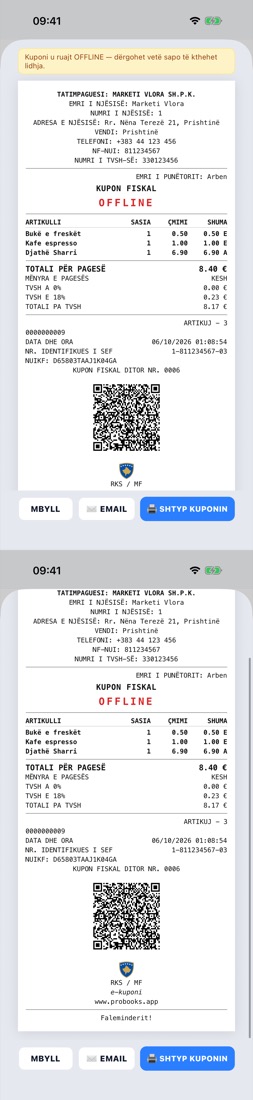
The offline receipt has a QR code and every field - plus the OFFLINE mark.
- The receipt is signed on the device with the till’s private key - this is what keeps SEF valid even without a connection.
- It gets its QR code and NUIKF like any other receipt. The QR code is mandatory even offline.
- It is stored in the till journal, which cannot be changed once the receipt is issued.
- The screen shows the note: Kuponi u ruajt OFFLINE - dërgohet vetë sapo të kthehet lidhja (Receipt saved OFFLINE - it will be sent automatically once the connection returns).
The 48-hour window
ATK rules give the till a deadline to restore communication and send the stored receipts. ProBooks counts this deadline for you and shows it in colour:
| Time offline | What the till shows |
|---|---|
| Up to 24 hours | Yellow pill - normal situation, receipts are waiting |
| 24-48 hours | Orange pill - time to check the connection |
| Over 48 hours | Red pill - the legal deadline has passed, notify the person in charge |
So the owner always knows how much time is left, without having to work it out.
When the internet comes back
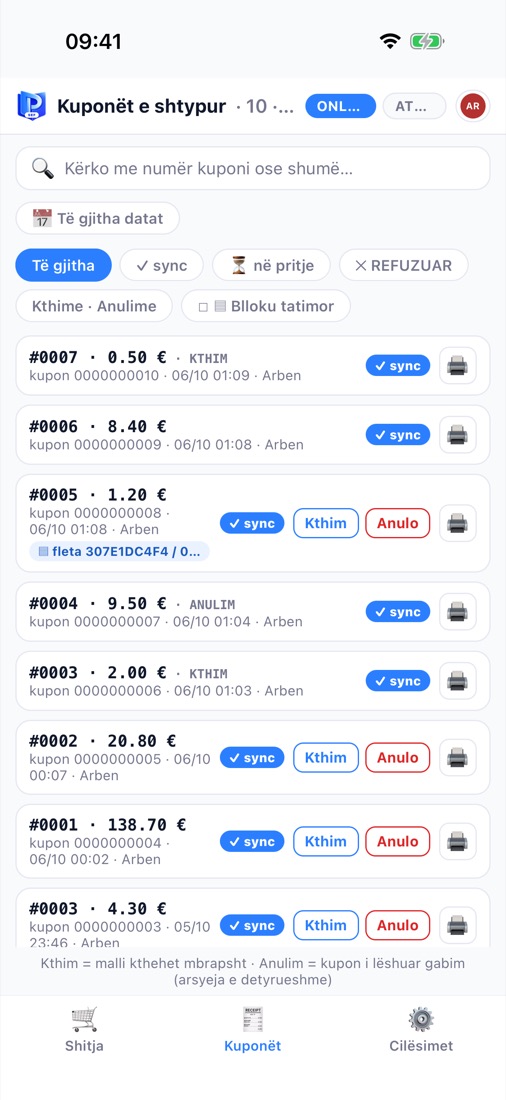
Once the connection is back, receipts are marked ✓ sync one by one.
- The till detects the connection on its own - there’s no button to press.
- Receipts are sent in order, oldest first, so the numbering at ATK stays correct.
- In the Kuponët (Receipts) tab, each one moves from ⏳ në pritje (pending) to ✓ sync.
- The banner disappears and the pill goes back to ONLINE.
If ATK rejects a receipt (for example, because of incorrect data), it is shown as ✕ REFUZUAR (Rejected) with the exact reason, so you can fix it.
Tips for owners
- Don’t leave the device switched off for days when receipts are pending - get it back online as soon as possible.
- Check the device clock; the till will warn you, but it’s best to keep it accurate.
- Keep an eye on the hours chip in the banner; once it passes 24 hours, check the connection.
- For venues with weak Wi-Fi (terraces, gardens), SEF Mobile on a phone with mobile data is the safest option.
Frequently asked questions
Is an offline receipt valid for the customer? Yes. The receipt has the QR code and every mandatory field. It is sent to ATK as soon as the connection returns.
What if the device breaks before the receipts are sent? The till journal is built to survive - and ProBooks helps you recover it. Contact us for details about your device.
Does MiniPOS for Windows also work offline? Yes, on the same principle: local signing, a tamper-proof journal and automatic sending when the connection returns.