
Unique Fiscalization Code: how to get it in EDI before using a SEF
The Unique Fiscalization Code is requested in EDI under «Fiskalizimi» → «Kërkesë për Fiskalizim» and is a prerequisite for a SEF. Who applies and how.
Updated · 5 min read

In short: The Unique Fiscalization Code (Kodi Unik për Fiskalizim) is the code ATK issues to a business before it starts fiscalizing with Electronic Fiscal Software (SEF), and it is a prerequisite for using a SEF. It is requested in the EDI electronic system, under «Fiskalizimi» → «Kërkesë për Fiskalizim», a service ATK announced on 9 July 2026 under Administrative Instruction (MF) no. 01/2026. Businesses that will start with a SEF and those moving from a fiscal device (PEF) to a SEF apply. If you already have the code, EDI shows it there; otherwise you submit the electronic request.
What the Unique Fiscalization Code is and why you need it
Under Administrative Instruction 01/2026, a fiscal receipt in Kosovo can also be issued by certified software (SEF), not only by a fiscal device with fiscal memory. Before a SEF connects to ATK’s system, the business has to be identified for fiscalization. That is the role of the Unique Fiscalization Code: ATK says in its notice that the purpose of the new EDI service is to issue taxpayers this code and that the code is a prerequisite for using a SEF.
In practice, the order is:
- the business gets the Unique Fiscalization Code in EDI;
- it picks a program from ATK’s public register of certified SEFs;
- every SEF at a point of sale gets its own digital certificate and fiscalization number;
- the first receipt with a QR code is issued.
Do not confuse this code with the codes EDI issues for the tax receipt book (sales written by hand when there is no till). That is a different service with a different purpose.
Your case: what you see in EDI and what you do
| Case | What you see under «Kërkesë për Fiskalizim» | What you do |
|---|---|---|
| Business starting with a SEF for the first time | No code shown | Submit the electronic request |
| Business with a fiscal device (PEF) moving to a SEF | No code shown | Submit the electronic request |
| Business that already has a code | The code is shown in the system | Do not apply again; go on to register the till |
| Business staying with its fiscal device only, no SEF | - | The 9 July notice is not addressed to these businesses |
ATK invites taxpayers who plan to use a SEF to check their status in EDI and to apply if the code is missing.
How to apply in EDI, step by step
- Log in to EDI with the business account.
- Open the «Fiskalizimi» menu and choose «Kërkesë për Fiskalizim».
- Check the status. If the code is shown, note it and go to step 6.
- Fill in and submit the electronic request with the data the form asks for.
- Follow the status in the same window until the code shows as issued. ATK’s notice gives no deadline for this.
- Choose the SEF and register the tills. With the code in hand, move to the till software: each point of sale gets its digital certificate and fiscalization number.
- Issue a test receipt and check that it has a QR code and that ATK accepted it.
If this is your first time, read the guide how fiscalization with a SEF works before step 6: it explains the receipt, offline work and returns.
The most common mistakes
- Buying the software before the code. Software without the code cannot fiscalize; start in EDI.
- Choosing a program that is not in ATK’s register. Only a certified SEF issues a valid receipt; see what Electronic Fiscal Software is.
- Applying twice. If the code is shown in EDI, this step is done.
- One certificate for several tills. Every SEF at a point of sale has its own certificate and fiscalization number.
How ProBooks helps
ProBooks is fiscalization and accounting software for businesses in Kosovo, certified by ATK as a SEF for Windows, macOS, Android and iOS. The Unique Fiscalization Code is obtained in EDI; the rest happens in ProBooks. In ProBooks web, the Fiskalizimi (ATK) page takes you through three steps (application, POS request and registration) and shows the status of each. Then the till, SEF Mobile on a phone, tablet or Mac or MiniPOS on Windows, is paired with the company using a one-time code from ProBooks web.
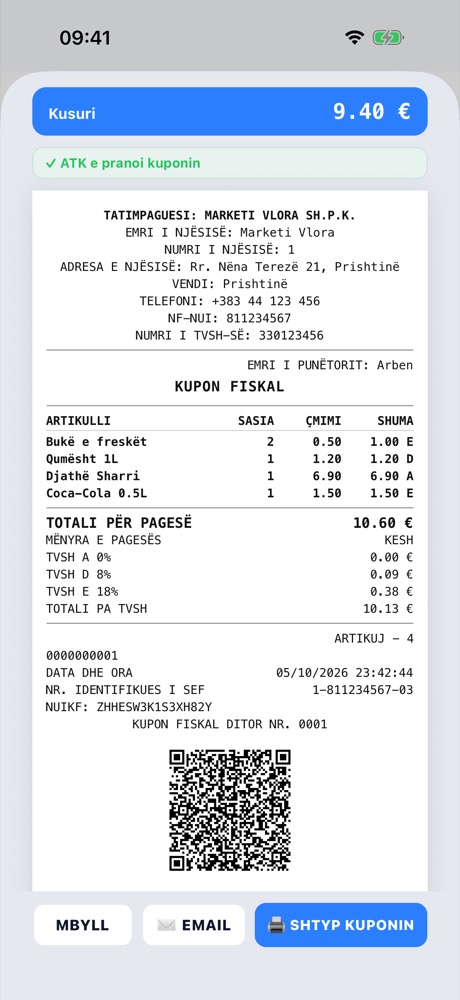
The first receipt: the QR code and ATK’s acceptance status.
The first till costs €100 a year and each additional till €50; packages with accounting are on the pricing page.
Frequently asked questions
Where do I find the request for the Unique Fiscalization Code in EDI? In ATK’s EDI electronic system, under the «Fiskalizimi» (Fiscalization) menu → «Kërkesë për Fiskalizim» (Fiscalization request). The service was added with the new version of EDI, announced by ATK on 9 July 2026.
Who has to apply for the Unique Fiscalization Code? According to ATK, taxpayers who will start using Electronic Fiscal Software (SEF) and those in the process of moving from Electronic Fiscal Devices (PEF) to SEF.
How do I know whether I already have the code? Open «Fiskalizimi» → «Kërkesë për Fiskalizim» in EDI. Taxpayers who have already been issued the Unique Fiscalization Code see it displayed in the system; the others submit the electronic request.
Is the code enough to issue fiscal receipts? No. The code is the first step. After it you need a SEF certified by ATK, and every SEF at a point of sale gets its own digital certificate and fiscalization number.
How long does it take to get the code? ATK’s notice gives no deadline for issuing the code. Follow the status of the request in EDI; if it gets stuck, ask ATK.
Sources
- Notice to taxpayers: new version of the EDI electronic system published - ATK, 09.07.2026, checked on 17.10.2026 (via the media republication of the notice)
- Administrative Instruction (MF) no. 01/2026 - ATK, administrative instructions
- Public register of certified SEFs - ATK
This text is informative; for your own case consult ATK or your accountant.