
Fiscal receipt or tax invoice? When to issue which in Kosovo
A fiscal receipt for the final consumer, a tax invoice for a business. How to decide under Instruction 01/2026 and what the payment method changes.
Updated · 6 min read

In short: The buyer decides the document, not the payment method. When you sell goods or services to the final consumer (an individual), you issue a fiscal receipt, whether they pay in cash, by card or by bank transfer. When the buyer is a business, the sale is documented with a tax invoice, not a receipt. The payment method only affects how you hand over the receipt: for a cash sale it is printed on paper, while for non-cash payments (with the buyer’s consent) and for online sales it may be delivered electronically (Administrative Instruction 01/2026, article 39).
The rule: who buys, not how they pay
Administrative Instruction (MFPT) no. 01/2026 of 27 April 2026 ties the fiscal receipt to supplies to the final consumer. So the first question before any sale is simple: is the buyer an individual or a business?
- Individual (B2C) - a fiscal receipt from the till: a fiscal device (PEF) or electronic fiscal software (SEF). A receipt is equally valid from either, as long as the software is certified by ATK.
- Business (B2B) - a tax invoice. An invoice does not replace the receipt for an individual, and a receipt does not replace the invoice for a business.
The exemption in article 31 follows from this rule: a business that supplies only other businesses and documents its sales with invoices is not required to install a SEF. Anyone who also sells to individuals must issue receipts for those sales. More on this in Who must move to a SEF, and when.
What the payment method changes
For an individual, the payment method does not change the duty to issue a receipt. It only changes the form in which the buyer gets it:
| Payment | Fiscal receipt? | How the receipt is delivered (article 39) |
|---|---|---|
| Cash | Yes | Printed on paper |
| Card | Yes | On paper, or electronically with the buyer’s consent |
| Bank transfer | Yes | On paper, or electronically with the buyer’s consent |
| Online sale | Yes | May be delivered electronically |
So even when a customer pays by card and doesn’t want the paper, the receipt is issued and fiscalized; it can simply go to them by email or message if they agree.
Eight situations: receipt or invoice?
| Situation | Document |
|---|---|
| A customer in a shop pays in cash | Fiscal receipt, printed |
| A customer in a café pays by card | Fiscal receipt |
| An individual pays for a service by bank transfer | Fiscal receipt |
| An online order from an individual | Fiscal receipt, may be delivered electronically |
| The customer pays part in cash and part by card | Fiscal receipt |
| A company buys supplies for its own office | Tax invoice |
| A wholesaler that supplies only shops | Tax invoice; no SEF required (article 31) |
| A public institution that accepts cash from citizens | Fiscal receipt; the institution installs a SEF (article 31) |
When a customer returns goods, the refund is also made with a receipt linked to the original one; the steps are in Refunds and cancellations. If your case matches none of the rows, ask ATK or your accountant before issuing the document.
Step by step before every sale
- Ask who is buying. An individual or a business? That decides the document.
- Individual: enter the items in the till and choose the payment method (cash, card, transfer or a combination).
- Close the sale: the receipt is signed, gets its QR code and is sent to ATK.
- Hand over the receipt: on paper for a cash payment; by email or message only for a non-cash payment when the buyer agrees, or for an online sale.
- Business: issue a tax invoice with the buyer’s details and keep it in your books.
- At the end of the day check that all receipts were accepted by ATK and that the invoices are recorded.
How ProBooks helps
ProBooks is fiscalization and accounting software for businesses in Kosovo, certified by ATK as a SEF. You issue the receipt for an individual from SEF Mobile on a phone, tablet or Mac, or from MiniPOS on Windows. In SEF Mobile the payment can be cash, card or bank transfer, or a combination in one sale. The receipt appears on screen, on the printer or by email.
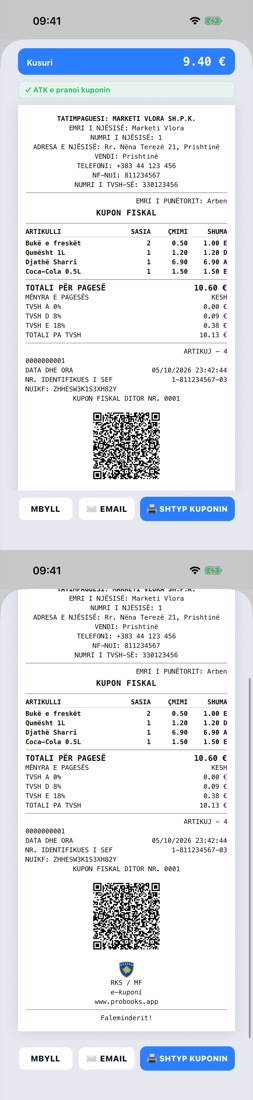
The fiscal receipt with VAT by rate and the verification QR code.
Invoices for businesses are created in ProBooks Invoicing: PDFs with your logo, stamp, signature and QR code, fiscalized and sent by email. Every invoice is posted to the books automatically, so receipts and invoices show up in the same reports. How to read VAT on a receipt is in VAT on the fiscal receipt; packages are on the pricing page.
Frequently asked questions
When do I issue a fiscal receipt and when a tax invoice? A fiscal receipt is issued for every sale to the final consumer, that is, to an individual. When the buyer is a business, the sale is documented with a tax invoice, not a receipt.
Do I need a fiscal receipt when the customer pays by card or bank transfer? Yes. Under Administrative Instruction 01/2026, the receipt is issued for a sale to the final consumer however it is paid: in cash, by card or by bank transfer.
Can I email the fiscal receipt instead of printing it? Only in some cases. Under article 39 of Instruction 01/2026, the receipt for a cash sale is printed on paper. It may be delivered electronically for non-cash payments, with the buyer’s consent, and for online sales.
My business sells only to other businesses. Do I need a fiscal till? No. Article 31 of Instruction 01/2026 exempts from the SEF obligation businesses that supply only other businesses and document their sales with tax invoices.
What if I sell both to individuals and to businesses? Use both documents: a fiscal receipt for sales to individuals and a tax invoice for sales to businesses. If a case is unclear, ask ATK or your accountant.
Sources
- Administrative Instruction (MFPT) no. 01/2026, 27.04.2026, articles 31 and 39 and the receipt rule for the final consumer - text on the ATK website, checked on 16.10.2026; the ATK website could not be reached on 19.10.2026
- ATK frequently asked questions - for questions this guide does not cover
This text is informative; for your own case consult ATK or your accountant.